How to get Google to index a new website
If your site went live in the last few weeks, the likely explanation is the boring one: Google has not got to you yet. What shortens the wait, and what does not.
If your site went live in the last few weeks and it is missing from Google, the most likely explanation is the boring one: Google has not got to you yet. Google's own documentation says crawling "can take anywhere from a few days to a few weeks," and that it "can take a week or so for Google to start crawling and indexing a new page or site." There is no button that shortens that, and nothing you can buy that shortens it either.
What you can do is make sure you are not adding weeks to the wait through a fixable mistake, and learn to read the difference between "too early" and "actively excluded." Those two look identical from the outside and have nothing in common underneath.
What this actually is
Google does not have an inbox. This is the reframe that fixes most of the confusion: you are not submitting your site to a queue where a person opens it. You are making your pages reachable by a crawler that walks links.
Google's How Search Works documentation names exactly three ways a URL enters the discovery pipeline: Google has already visited the page, Google extracted a link to it from a page it already knows, or you submitted a sitemap listing it.
That is the whole list. A brand new domain with no inbound links and no sitemap satisfies none of the three. Google says it normally finds sites without being asked, then concedes the gap in the same breath: "it's inevitable that some sites will be missed," and the first case it names is a site that no other site links to. Nothing is broken. Nothing is penalized. The crawler has no path to your door.
Then a second, separate decision happens. Crawled is not indexed. Google states plainly that it "doesn't guarantee that it will crawl, index, or serve your page, even if your page follows the Google Search Essentials." Discovery gets you looked at. Indexing is a judgment Google makes afterwards, and it can decline.
How to check
You need Google Search Console. It is free, and it is Google reporting on its own index: what Google holds for your property, and the reason when it holds nothing. A site: search in the search box is a rough proxy at best.
Set it up in this order.
1. Go to Search Console and add a property. Choose a Domain property if you can: it covers every protocol and subdomain variation of your domain in one place. It verifies one way only, through the domain name system (DNS): a TXT record, or a canonical name (CNAME) record, which is a DNS alias pointing one name at another. You add that record wherever your DNS is actually hosted, which Google calls your domain name provider. Often that is the registrar you bought the name from, but not always: if you moved DNS to a host or a content delivery network, the record goes there instead, and adding it at the registrar will never verify. A URL-prefix property covers only the exact prefix you type, and accepts HTML file upload, an HTML meta tag, Google Analytics, or Google Tag Manager as verification instead.
2. Wait. Search Console says data "should begin to appear in your property in a few days," and that if your property has no data several days after verification, "it is possibly because the site hasn't been seen in Google Search." That sentence is your first real diagnostic signal.
3. Paste your homepage URL into the inspection bar at the top of Search Console. This is the URL Inspection tool, and it is the single most useful screen in this whole exercise.
Read the result carefully, because the tool is answering a question about the past. Search Console warns: "This is not a live test. The results shown are from most recently indexed version of a page, not the live version on the web." If you fixed something an hour ago, this screen has not seen it. Click "Test live URL" for the current state.
Both inspection modes are rate-limited: there is a daily limit of inspection requests per property, and a separate per-property daily limit of live inspections. Budget them.
What you will see
The top-line verdict is one of four states.
URL is on Google. Indexed and eligible to appear. Google adds a caveat worth reading: this "does not guarantee that your page is appearing in Search results," because the tool does not verify every requirement.
URL is on Google, but has issues. Indexed, with a problem in an enhancement such as malformed structured data. The page is in. The rich result is not.
URL is an alternate version. An AMP page serving as the alternate of a canonical non-AMP page. Rare on small sites.
URL is not on Google. The page cannot appear in search results. This is the state you are here for, and the reason line underneath it is where the actual diagnosis lives.
The Page Indexing report uses the same reason vocabulary, and these are the ones that separate "too early" from "excluded":
Discovered - currently not indexed. Google's definition: "The page was found by Google, but not crawled yet. Typically, Google wanted to crawl the URL but this was expected to overload the site; therefore Google rescheduled the crawl." This is too early. Google knows you exist. It has not come by. If your host is slow, this is also a hint to look at server response time.
Crawled - currently not indexed. Google came, read the page, and passed. Google's own guidance: "It may or may not be indexed in the future; no need to resubmit this URL for crawling." Resubmitting does nothing here. This is a content and duplication problem, not a discovery problem.
URL marked 'noindex'. Not too early. Actively excluded, by your own markup. Google's definition: "When Google tried to index the page it encountered a 'noindex' directive and therefore did not index it." Staging sites shipped to production with the directive still in place are the classic cause. Look in two places, because the directive has two forms: <meta name="robots" content="noindex"> in the page <head>, and an X-Robots-Tag: noindex HTTP response header, which does not show up in view-source. Read the header with your browser's network panel, or with curl -I https://example.com/.
URL blocked by robots.txt. Also actively excluded, by your own file. Note the interaction, because it catches people going the other way: a blocked page is never fetched, so a noindex inside it is never read. Google is explicit that "if the page is blocked by a robots.txt file or the crawler can't access the page, the crawler will never see the noindex rule, and the page can still appear in search results." To remove a page, allow the crawl and use noindex. To index a page, do neither.
Page with redirect, Alternate page with proper canonical tag, and Duplicate without user-selected canonical. Google chose a different URL as the canonical. The content is probably indexed, under an address you did not check.
Not found (404), Soft 404, and URL blocked due to other 4xx issue. A server problem, not a Google problem. A soft 404 is a page that shows a friendly "not found" message while returning HTTP 200, which is its own repair.
The test: if the reason names a directive, a redirect, a canonical, or a status code, you are excluded and you have a specific thing to fix. If the reason is "Discovered - currently not indexed," or the URL is unknown, you are early.
How to fix
Build a real sitemap and submit it in the right place. An XML sitemap is a list of your canonical URLs. Use fully qualified absolute URLs: Google "will attempt to crawl your URLs exactly as listed." Include only the canonical version of each page, never the duplicates. The limits are 50MB uncompressed and 50,000 URLs per file, which no small business site will approach.
A valid sitemap is short enough to write by hand:
<?xml version="1.0" encoding="UTF-8"?><urlset xmlns="http://www.sitemaps.org/schemas/sitemap/0.9"> <url> <loc>https://example.com/</loc> <lastmod>2026-08-17</lastmod> </url> <url> <loc>https://example.com/services/</loc> </url></urlset>
Save it as UTF-8, and set lastmod only when the page genuinely changed. Google uses that date to schedule crawls, and it ignores the value on sites that stamp every URL with today's date on every build.
Host it at a public URL, then submit it two ways. Add a line to robots.txt:
Sitemap: https://example.com/sitemap.xml
Then open the Sitemaps report in Search Console, paste the sitemap URL into the "Add a new sitemap" box, and submit. As the documentation puts it: "You cannot actually upload a sitemap to Google." You are giving Google an address to fetch.
Afterwards, the report shows one of three statuses: Success ("fetched and read without any errors"), Has errors ("could be fetched, but has one or more errors"), or Couldn't fetch ("could not be fetched for some reason"). Couldn't fetch usually means a typo, a 404, or a robots.txt rule blocking the sitemap itself.
Read the "Discovered pages" number as what it is: "the number of page URLs that were parsed from the sitemap." Google is explicit that there is "no guarantee that a page URL discovered in a sitemap has been or will be crawled or indexed."
Request indexing on your few most important pages. In URL Inspection, click "Request Indexing." Understand what you bought: "Requesting a crawl does not guarantee that inclusion in search results will happen instantly or even at all." There is a quota on individual URL submissions, and "requesting a recrawl multiple times for the same URL won't get it crawled any faster." Google does not publish the quota number, so treat it as scarce: pick the handful of pages that matter, submit each once, and stop. For anything larger than a handful, Google tells you to use the sitemap instead.
Make your internal links crawlable. Google can only follow a link that is "an <a> HTML element with an href attribute." A <span href="...">, an <a onclick="goto(...)">, an <a href="javascript:goTo('products')">, or an Angular routerLink are invisible to the crawler. Google's rule: "every page you care about should have a link from at least one other page on your site." Once your homepage is crawled, correct internal links are what pull the rest of the site in behind it.
Get one link from a site Google already crawls. Your listing on a supplier directory, a local chamber of commerce page, your own LinkedIn or GitHub profile. This is the discovery mechanism that does not depend on Google getting around to your sitemap.
IndexNow: worth twenty minutes, and not for Google. IndexNow is a push protocol: you generate a key, publish it as a text file at your domain root, and POST changed URLs (up to 10,000 per request). The root is the default, not a requirement: any publicly readable location on the same host works, as long as you name it in the keyLocation parameter of the request. The participating engines are "Amazon, Bing, Naver, Seznam.cz, Yandex, and Yep." Google is not among them. IndexNow itself says "Submitting a URL does not guarantee immediate indexing." Do it for Bing coverage, and expect nothing from Google.
What does not work. Paid submission services: Google "doesn't accept payment to crawl a site more frequently, or rank it higher. If anyone tells you otherwise, they're wrong." Google warns specifically against anyone advertising a "priority submit" to Google, or "submitting your site to thousands of search engines." The keywords meta tag has been dead since 2009: "Google does not use the keywords meta tag in web ranking." And the old sitemap ping endpoint is gone: Google announced the deprecation on 26 June 2023, said the endpoint would stop working about six months later, and gave the reason as "the vast majority of the submissions lead to spam." Ouch. Requests to it now return a 404. Submit through robots.txt and Search Console instead.
What it costs
Search Console setup: 20 minutes, plus DNS propagation if you take the Domain property route. Sitemap generation: built into most site platforms, or 30 minutes by hand for a small site. Auditing internal links for real <a href> elements: one to three hours, and it is the step people skip.
The waiting is the real cost, and it is not negotiable: a few days to a few weeks for a first crawl, a week or so before a new site starts appearing. Check Search Console once a week, not once an hour. My own threshold, not Google's: if four weeks pass with no reason line other than "Discovered - currently not indexed," I stop treating it as a discovery problem and start working down the rest of this list.
If you want the whole site checked at once rather than page by page, run a free web audit.
References
How Google Search Works - Google Search CentralGet your website on Google - Google Search CentralAsk Google to Recrawl Your Website - Google Search CentralURL Inspection tool - Search Console HelpPage indexing report - Search Console HelpSitemaps report - Search Console HelpBuild and submit a sitemap - Google Search CentralSEO Link Best Practices for Google - Google Search CentralVerify your site ownership - Search Console HelpAdd a website or platform property to Search Console - Search Console HelpDo you need an SEO? - Google Search CentralSitemaps ping endpoint is going away - Google Search Central Blog, 26 June 2023Google does not use the keywords meta tag in web ranking - Google Search Central BlogIndexNow FAQ - IndexNow.orgBlock Search indexing with noindex - Google Search CentralBy Jesper Jurcenoks
Next in the series
How to fix a website that breaks on a phone
Your desktop rankings are computed from the phone rendering. Google indexes with Googlebot Smartphone, so what a phone cannot reach is not indexable.
2026-08-18
Google picked a different version of your page: fixing duplicate URLs and canonicals
Your page is indexed. Google just indexed a different URL of it than the one you promote and track. Pick one form, redirect the rest, make the signals agree.
2026-08-18
How to find and remove a noindex tag or robots.txt block that keeps your site out of Google
Your site is not missing from Google. It is being refused, on your own instruction. Three mechanisms can issue it, and two leave nothing in your HTML.
2026-08-18
Only your homepage is indexed: how to get Google to find the rest of your site
Google indexes what it can reach. If only your homepage is indexed, your pages are not being outranked: they are not being found. Internal links come first.
2026-08-18
How to get backlinks for a small business
Of the nine reasons your site is missing from Google, links are the one you control least. Fix the other eight first, then claim the links you are owed.
2026-08-18How to get Google to index a new website
If your site went live in the last few weeks, the likely explanation is the boring one: Google has not got to you yet. What shortens the wait, and what does not.
2026-08-18
How to make your website faster and pass Core Web Vitals
Compressing your images will not fix this. Three numbers decide whether Google calls your site fast, and two are set by your architecture, not your assets.
2026-08-18
How to show up in local Google search when you serve a town
Your website is not your entry on the map. The map pack is fed by a Google Business Profile, a separate record you must claim and verify to compete on it.
2026-08-18
My page is indexed but gets no traffic: how to make it answer the question
Your page is not missing from Google. It is present and unwanted. Search Console tells you which problem you have: not being shown, or shown and not chosen.
2026-08-18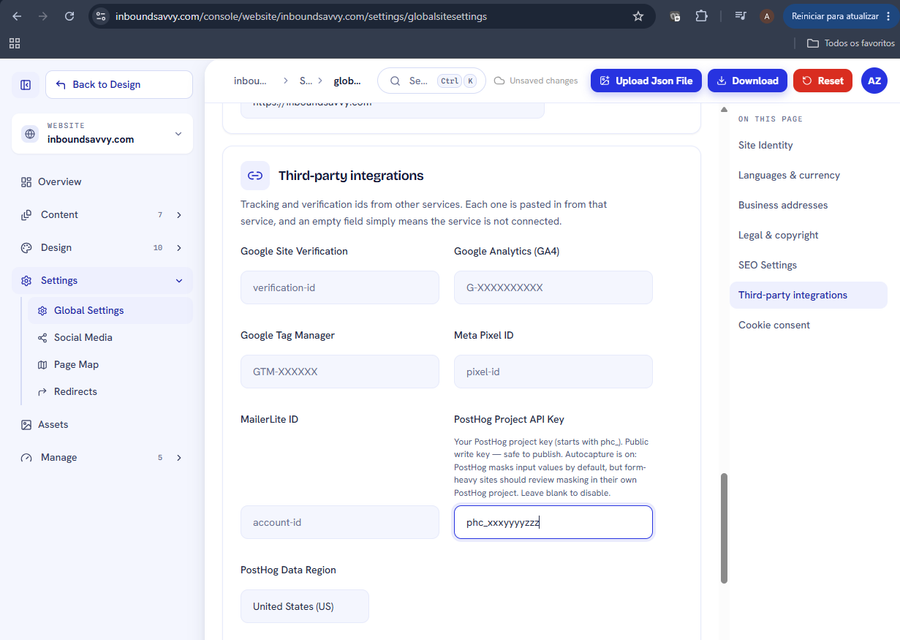
Set Up PostHog Analytics for Your Website
PostHog shows what visitors actually do on your site. InboundSavvy has it built in: one token, one dropdown. Includes how to connect PostHog's MCP server so your AI assistant can query the data.
2026-08-05
How to Get Your Small Business Found on Google in 2026
Getting found on Google changed with AI Overviews and AI Mode. Here's what actually moves the needle for a small business in 2026 - in plain English, no jargon.
2026-07-01
Why Isn't My Website Showing Up on Google? (9 Reasons + Fixes)
Nine reasons a small-business site does not appear in Google, each with the exact check that identifies it and the actual repair. Including what Search Console and Lighthouse each tell you, and why they disagree.
2026-06-28
The Small-Business Website SEO Checklist for 2026
SEO for a small business comes down to a handful of things done well. Here's a practical 2026 checklist, grouped by what each item actually does for you.
2026-06-25
Let Claude Edit Your Website: Connecting InboundSavvy to Claude Code
A non-technical guide to setting up InboundSavvy's MCP integration with Claude Code - one prompt, a few clicks, and AI starts building your website.
2026-05-25Other articles
How to fix a website that breaks on a phone
Your desktop rankings are computed from the phone rendering. Google indexes with Googlebot Smartphone, so what a phone cannot reach is not indexable.
2026-08-18Google picked a different version of your page: fixing duplicate URLs and canonicals
Your page is indexed. Google just indexed a different URL of it than the one you promote and track. Pick one form, redirect the rest, make the signals agree.
2026-08-18How to find and remove a noindex tag or robots.txt block that keeps your site out of Google
Your site is not missing from Google. It is being refused, on your own instruction. Three mechanisms can issue it, and two leave nothing in your HTML.
2026-08-18Only your homepage is indexed: how to get Google to find the rest of your site
Google indexes what it can reach. If only your homepage is indexed, your pages are not being outranked: they are not being found. Internal links come first.
2026-08-18How to get backlinks for a small business
Of the nine reasons your site is missing from Google, links are the one you control least. Fix the other eight first, then claim the links you are owed.
2026-08-18How to get Google to index a new website
If your site went live in the last few weeks, the likely explanation is the boring one: Google has not got to you yet. What shortens the wait, and what does not.
2026-08-18How to make your website faster and pass Core Web Vitals
Compressing your images will not fix this. Three numbers decide whether Google calls your site fast, and two are set by your architecture, not your assets.
2026-08-18How to show up in local Google search when you serve a town
Your website is not your entry on the map. The map pack is fed by a Google Business Profile, a separate record you must claim and verify to compete on it.
2026-08-18My page is indexed but gets no traffic: how to make it answer the question
Your page is not missing from Google. It is present and unwanted. Search Console tells you which problem you have: not being shown, or shown and not chosen.
2026-08-18Set Up PostHog Analytics for Your Website
PostHog shows what visitors actually do on your site. InboundSavvy has it built in: one token, one dropdown. Includes how to connect PostHog's MCP server so your AI assistant can query the data.
2026-08-05How to Get Your Small Business Found on Google in 2026
Getting found on Google changed with AI Overviews and AI Mode. Here's what actually moves the needle for a small business in 2026 - in plain English, no jargon.
2026-07-01Why Isn't My Website Showing Up on Google? (9 Reasons + Fixes)
Nine reasons a small-business site does not appear in Google, each with the exact check that identifies it and the actual repair. Including what Search Console and Lighthouse each tell you, and why they disagree.
2026-06-28The Small-Business Website SEO Checklist for 2026
SEO for a small business comes down to a handful of things done well. Here's a practical 2026 checklist, grouped by what each item actually does for you.
2026-06-25Let Claude Edit Your Website: Connecting InboundSavvy to Claude Code
A non-technical guide to setting up InboundSavvy's MCP integration with Claude Code - one prompt, a few clicks, and AI starts building your website.
2026-05-25