Only your homepage is indexed: how to get Google to find the rest of your site
Google indexes what it can reach. If only your homepage is indexed, your pages are not being outranked: they are not being found. Internal links come first.
Google indexes what it can reach. If the homepage is in the index and nothing else is, your pages are not being outranked: they are not being found. Fix it in this order: internal links first, sitemap second, submission third. Doing it the other way round is the most common wasted afternoon in small-business SEO.
What this actually is
Google's own sitemap documentation states the mechanism in one sentence: "Googlebot and other web crawlers crawl the web by accessing URLs found in previously crawled pages." Your site is a graph, links are the edges, and a crawler walks edges. No edge, no visit.
A page nothing links to is an orphan page. It sits on the server, returns 200, renders correctly, and no crawler will ever arrive. You reach it by typing the URL. Googlebot does not type URLs.
Orphans are made by accident: a page published from a content management system (CMS) that adds it to no menu, a campaign landing page, an old article that fell off page two of the blog index, or a page whose only link lives in a JavaScript click handler instead of an <a href>.
There is a second mechanism behind the first. Google decides how much of a site to fetch from crawl demand, which it says varies with perceived inventory, popularity, and staleness. A page nothing links to scores low on all three. Discovery failure and "Google looked and moved on" are cousins, not strangers.
How to check
Four checks, in this order.
1. Search Console, Indexing, Pages. The Page indexing report splits your URLs into indexed and not indexed, with a named reason for each exclusion group. Write down the indexed count and compare it against the number of pages you actually published.
2. Search Console, Indexing, Sitemaps. Confirm a sitemap is submitted, its status is Success, and its discovered-URL count matches your page count. One trap: this report lists only sitemaps submitted through the report itself or the Search Console API. A sitemap Google found through your robots.txt does not appear here, so an empty report is not proof that Google has no sitemap.
3. URL Inspection, run on three pages you believe are missing. It reports whether the URL is on Google, when it was last crawled, and how it was discovered: sitemap, referring page, or neither.
4. Crawl your own site. Point a crawler that starts at the homepage and follows only <a href> links at your domain, then diff that list against your sitemap. Every URL in the sitemap and not in the crawl is an orphan. That diff is your work list.
What you will see
The Page indexing report uses fixed labels. Two of them are the discovery problem, in Google's own words.
"Crawled - currently not indexed": "The page was crawled by Google but not indexed. It may or may not be indexed in the future; no need to resubmit this URL for crawling." Google looked and declined. Resubmitting changes nothing. The levers are the page itself, if it is thin or near-duplicate, and the internal links pointing at it. A page with four contextual links from indexed pages is not the same page, to Google's systems, as one with none.
"Discovered - currently not indexed": "The page was found by Google, but not crawled yet. Typically, Google wanted to crawl the URL but this was expected to overload the site; therefore Google rescheduled the crawl." The last-crawl date is empty. Two causes: your server is slow to respond, or crawl demand for that URL is too low to spend budget on. Fix the server, or raise the page's apparent value with links.
"Page with redirect", "Duplicate without user-selected canonical", and "Alternate page with proper canonical tag" are not discovery problems. Different repair.
In the Sitemaps report, "Couldn't fetch" means Google never retrieved the file at all. Google lists the causes: robots.txt blocks it, the site has an unresolved manual action, the URL is wrong and returns 404, some other general error such as server unavailability, or crawl demand for the sitemap is too low. Server errors are often transient, so give it a crawl cycle before you rebuild anything.
Broken XML is a separate status. A file Google fetched but could not read shows "Sitemap could not be read" on the details page. One it fetched and read partly shows "Sitemap had X errors", and the error named "Parsing error" means the XML would not parse, usually an unescaped &, ', ", <, or > sitting inside a URL.
How to fix
Write the sitemap
The protocol requires very little. A <urlset> element carrying the namespace, one <url> element per page, and one <loc> child inside each. Everything else is optional.
<?xml version="1.0" encoding="UTF-8"?><urlset xmlns="http://www.sitemaps.org/schemas/sitemap/0.9"> <url> <loc>https://example.com/services/</loc> <lastmod>2026-08-14</lastmod> </url></urlset>
Include lastmod. Google uses it as a signal for scheduling crawls to URLs it has already discovered, on two conditions: the date must be in a W3C Datetime format sitemaps.org supports, 2026-08-14 or 2026-08-14T18:00:15+00:00, and it must match reality. Search Console tells you if the format is wrong once you submit. Gary Illyes put the consequence plainly in 2023: if the page changed seven years ago and you claim yesterday, "eventually we're not going to believe you anymore." Last modification means last significant modification: primary text, structured data, links. Not a footer tweak.
Leave out changefreq and priority. Google uses neither. It calls priority "a heavily subjective field" that generally does not reflect a page's actual relative priority.
The rules that break sitemaps in practice:
- Fully qualified absolute URLs, in canonical form. Google crawls them exactly as listed, so a relative /mypage.html is not a usable entry. One sitemap can carry URLs from several hosts and several domains, but only if you have verified every one of those sites in Search Console and submit the sitemap there. Without that verification, keep it to one host per sitemap.
- One sitemap holds at most 50,000 URLs and 50MB uncompressed. Past either limit, split the file and list the parts in a sitemap index file. Every sitemap requirement applies to the index file too: at most 50,000 <loc> entries, and the sitemaps it lists must sit on the same site, in the index file's own directory or deeper. Cross-site submission waives the same-site half of that. Search Console accepts up to 500 sitemap index files per site.
- A sitemap affects only descendants of its own directory, unless you submit it through Search Console, which lifts that limit. Putting it at the root, /sitemap.xml, makes the question moot, and that is where Google recommends putting it.
- UTF-8 encoding, entity-escaped values.
- Do not list URLs you noindex, redirect, or block in robots.txt. Search Console will flag every one, and you will spend an evening chasing warnings you created yourself.
Submit it
Two channels remain. The old ping endpoint was retired in 2023 and now returns 404, so anything that still calls it is shouting into a closed window.
robots.txt: add Sitemap: https://example.com/sitemap.xml. It must be a fully qualified URL including protocol and host. The field name is case-insensitive, the value is not. Multiple Sitemap lines are allowed, and robots.txt itself must sit at the top level of the host.
Search Console: Indexing, Sitemaps, enter the path, Submit.
Do both, because they do different jobs. The robots.txt Sitemap field is tied to no particular user agent and may be followed by any crawler that reads the file, and the URL it points at does not have to be on the same host as the robots.txt itself. Search Console is what hands you the fetch and parse errors, and its Sitemaps report covers only what was submitted through the report or the API. A sitemap Google knows about solely through robots.txt gets you no error reporting at all.
Fix the internal links, which is the actual job
A sitemap tells Google a URL exists. It does not tell Google the URL matters. Google's wording: a sitemap "doesn't guarantee that all the items in your sitemap will be crawled and indexed." An orphan listed in a sitemap is still an orphan: known, unsupported by any internal signal, queued behind everything that has links pointing at it. Ouch.
The working rule: every page you want indexed is reachable from the homepage by following <a href> links, in three clicks or fewer. Google publishes no click-depth threshold, so treat three as a constraint you impose on yourself, not a rule handed down. What Google does publish is the target state: you may not need a sitemap at all if "Googlebot can find all the important pages on your site by following links starting from the home page."
Getting there:
- Every link is an <a> element with an href. Google's wording: it can generally only crawl a link in that form, and most links in other formats will not be parsed and extracted by its crawlers. <span href="...">, <a onclick="...">, <a routerLink="...">, and href="javascript:..." all sit in Google's not-recommended column. Google says it may still attempt to parse them, which is not a thing to build a site on. JavaScript that inserts a real <a href> into the page is fine.
- Anchor text carries the meaning. "Click here" tells Google nothing about the destination. Descriptive text does. For image links, Google uses the img element's alt attribute as the anchor text, so an empty alt on an image link is an empty anchor. If the <a> element ends up empty anyway, Google falls back to its title attribute.
- Build hub pages. One page per topic that links to every page in that topic, and every page in the topic links back to the hub. That is how you keep depth low without a 200-item menu.
- Spend the homepage deliberately. It is the one page Google already trusts on your site. Link from it to the three or four pages you most want found, then repeat the move one level down.
- Rerun the crawl-versus-sitemap diff after every publish. This is not a task you finish, it is a habit you keep.
Pagination
Paginated archives strand old content on page four where nothing links to it.
Link pages sequentially with <a href>. Google's crawlers do not click buttons and generally do not trigger JavaScript that requires a user action, so a "Load more" button with no underlying link hides everything behind it.
Give each page its own URL, such as ?page=2, and its own canonical. Do not canonicalize page two onward to page one. Do not put the page number in a URL fragment: Google ignores fragments, and if the next-page link differs only after the #, Googlebot may not follow it at all. rel="next" and rel="prev" no longer do anything at Google.
Faceted navigation
Filters that write parameters into the URL generate a combinatorial URL space. Google names two costs: overcrawling, and slower discovery crawls, because crawl time spent on useless filter URLs is time not spent on your new pages. That is how a filter widget starves your article archive.
If you do not need filtered URLs indexed, block the parameters:
user-agent: Googlebotdisallow: /*?*color=disallow: /*?*size=allow: /*?color=all$
The alternative is to move filters into the URL fragment, which Google generally does not crawl or index. Either way, keep one unfiltered listing page that links to every item, and link that page from the homepage.
What it costs
Sitemap: one to two hours if you are hand-rolling it, close to zero if your CMS already generates one. WordPress, Wix, and Blogger generally ship one.
robots.txt line plus Search Console submission: ten minutes.
Crawl and orphan diff: about an hour for a site under a few hundred pages, longer if the crawl surfaces things you would rather not have learned.
Internal linking: half a day for the first pass on a small site, then permanent. Every new page needs its inbound links at publish time, or it starts life as an orphan.
Then waiting. Google gives no service-level agreement on crawl scheduling. Allow two to four weeks before judging the result. "Discovered - currently not indexed" clearing out is the first signal, the indexed count rising is the second.
Want the orphan list, the sitemap validation, and the click-depth map produced for you: run a free web audit.
References
Sitemaps overview - Google Search CentralBuild and submit a sitemap - Google Search CentralManage your sitemaps with sitemap index files - Google Search CentralSitemaps XML format - sitemaps.orgSitemaps ping endpoint is going away - Google Search Central Blog, Gary IllyesSitemaps report - Google Search Console HelpPage indexing report - Google Search Console HelpURL Inspection Tool - Google Search Console HelpHow Google interprets the robots.txt specification - Google Search CentralIntroduction to robots.txt - Google Search CentralMake your links crawlable - Google Search CentralCrawl budget management for large sites - Google Search CentralPagination, incremental page loading, and Search - Google Search CentralFaceted navigation best practices - Google Search CentralSEO Starter Guide - Google Search CentralScreaming Frog SEO Spider - Screaming FrogBy Jesper Jurcenoks
Next in the series
How to fix a website that breaks on a phone
Your desktop rankings are computed from the phone rendering. Google indexes with Googlebot Smartphone, so what a phone cannot reach is not indexable.
2026-08-18
Google picked a different version of your page: fixing duplicate URLs and canonicals
Your page is indexed. Google just indexed a different URL of it than the one you promote and track. Pick one form, redirect the rest, make the signals agree.
2026-08-18
How to find and remove a noindex tag or robots.txt block that keeps your site out of Google
Your site is not missing from Google. It is being refused, on your own instruction. Three mechanisms can issue it, and two leave nothing in your HTML.
2026-08-18Only your homepage is indexed: how to get Google to find the rest of your site
Google indexes what it can reach. If only your homepage is indexed, your pages are not being outranked: they are not being found. Internal links come first.
2026-08-18
How to get backlinks for a small business
Of the nine reasons your site is missing from Google, links are the one you control least. Fix the other eight first, then claim the links you are owed.
2026-08-18
How to get Google to index a new website
If your site went live in the last few weeks, the likely explanation is the boring one: Google has not got to you yet. What shortens the wait, and what does not.
2026-08-18
How to make your website faster and pass Core Web Vitals
Compressing your images will not fix this. Three numbers decide whether Google calls your site fast, and two are set by your architecture, not your assets.
2026-08-18
How to show up in local Google search when you serve a town
Your website is not your entry on the map. The map pack is fed by a Google Business Profile, a separate record you must claim and verify to compete on it.
2026-08-18
My page is indexed but gets no traffic: how to make it answer the question
Your page is not missing from Google. It is present and unwanted. Search Console tells you which problem you have: not being shown, or shown and not chosen.
2026-08-18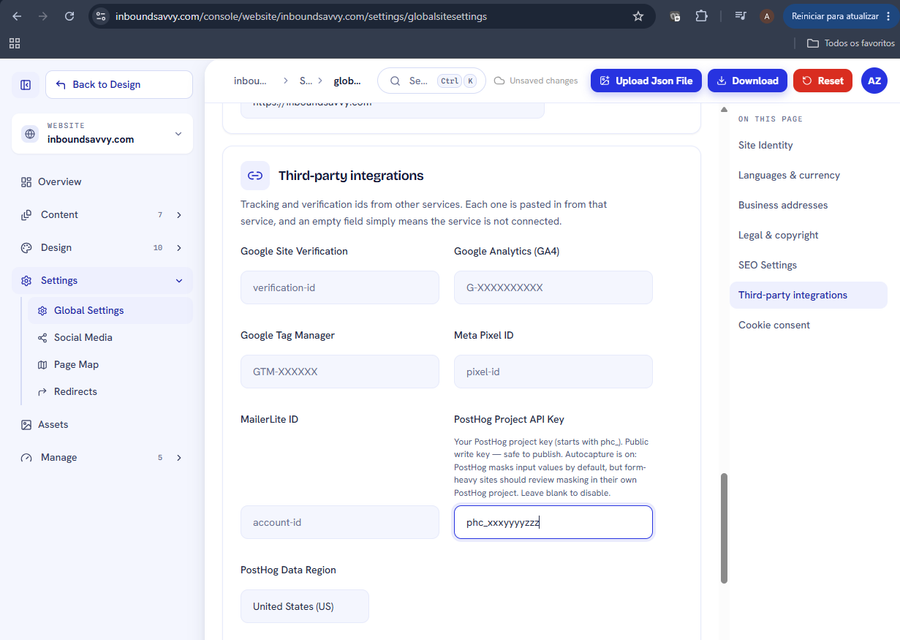
Set Up PostHog Analytics for Your Website
PostHog shows what visitors actually do on your site. InboundSavvy has it built in: one token, one dropdown. Includes how to connect PostHog's MCP server so your AI assistant can query the data.
2026-08-05
How to Get Your Small Business Found on Google in 2026
Getting found on Google changed with AI Overviews and AI Mode. Here's what actually moves the needle for a small business in 2026 - in plain English, no jargon.
2026-07-01
Why Isn't My Website Showing Up on Google? (9 Reasons + Fixes)
Nine reasons a small-business site does not appear in Google, each with the exact check that identifies it and the actual repair. Including what Search Console and Lighthouse each tell you, and why they disagree.
2026-06-28
The Small-Business Website SEO Checklist for 2026
SEO for a small business comes down to a handful of things done well. Here's a practical 2026 checklist, grouped by what each item actually does for you.
2026-06-25
Let Claude Edit Your Website: Connecting InboundSavvy to Claude Code
A non-technical guide to setting up InboundSavvy's MCP integration with Claude Code - one prompt, a few clicks, and AI starts building your website.
2026-05-25Other articles
How to fix a website that breaks on a phone
Your desktop rankings are computed from the phone rendering. Google indexes with Googlebot Smartphone, so what a phone cannot reach is not indexable.
2026-08-18Google picked a different version of your page: fixing duplicate URLs and canonicals
Your page is indexed. Google just indexed a different URL of it than the one you promote and track. Pick one form, redirect the rest, make the signals agree.
2026-08-18How to find and remove a noindex tag or robots.txt block that keeps your site out of Google
Your site is not missing from Google. It is being refused, on your own instruction. Three mechanisms can issue it, and two leave nothing in your HTML.
2026-08-18Only your homepage is indexed: how to get Google to find the rest of your site
Google indexes what it can reach. If only your homepage is indexed, your pages are not being outranked: they are not being found. Internal links come first.
2026-08-18How to get backlinks for a small business
Of the nine reasons your site is missing from Google, links are the one you control least. Fix the other eight first, then claim the links you are owed.
2026-08-18How to get Google to index a new website
If your site went live in the last few weeks, the likely explanation is the boring one: Google has not got to you yet. What shortens the wait, and what does not.
2026-08-18How to make your website faster and pass Core Web Vitals
Compressing your images will not fix this. Three numbers decide whether Google calls your site fast, and two are set by your architecture, not your assets.
2026-08-18How to show up in local Google search when you serve a town
Your website is not your entry on the map. The map pack is fed by a Google Business Profile, a separate record you must claim and verify to compete on it.
2026-08-18My page is indexed but gets no traffic: how to make it answer the question
Your page is not missing from Google. It is present and unwanted. Search Console tells you which problem you have: not being shown, or shown and not chosen.
2026-08-18Set Up PostHog Analytics for Your Website
PostHog shows what visitors actually do on your site. InboundSavvy has it built in: one token, one dropdown. Includes how to connect PostHog's MCP server so your AI assistant can query the data.
2026-08-05How to Get Your Small Business Found on Google in 2026
Getting found on Google changed with AI Overviews and AI Mode. Here's what actually moves the needle for a small business in 2026 - in plain English, no jargon.
2026-07-01Why Isn't My Website Showing Up on Google? (9 Reasons + Fixes)
Nine reasons a small-business site does not appear in Google, each with the exact check that identifies it and the actual repair. Including what Search Console and Lighthouse each tell you, and why they disagree.
2026-06-28The Small-Business Website SEO Checklist for 2026
SEO for a small business comes down to a handful of things done well. Here's a practical 2026 checklist, grouped by what each item actually does for you.
2026-06-25Let Claude Edit Your Website: Connecting InboundSavvy to Claude Code
A non-technical guide to setting up InboundSavvy's MCP integration with Claude Code - one prompt, a few clicks, and AI starts building your website.
2026-05-25