Building pages
Get an image onto a page
An image is referenced by its filename alone. A path, a leading slash, or a web address in that field renders nothing.
Images live in the site's assets area, organised into folders that match the collection using them.
Upload one
1
Rename the file before you upload it: lowercase, hyphens, no spaces. The filename is how you will refer to it forever.
2
Check the size. The Console accepts up to 5 megabytes per file. An AI assistant uploading through the Model Context Protocol (MCP) is capped lower, at 3 megabytes, so keep under that if a tool does your uploads.
3
Open Assets in the sidebar, or add an image block in the editor and upload from there.
4
Place the image on a page and write its alt text there. Alt text belongs to the image on the page, not to the file, so the same photo can carry different alt text in two places.
Accepted types in the Console: JPG, PNG, SVG, WebP, and GIF. You can drop files anywhere in the asset window rather than hunting for an upload button.
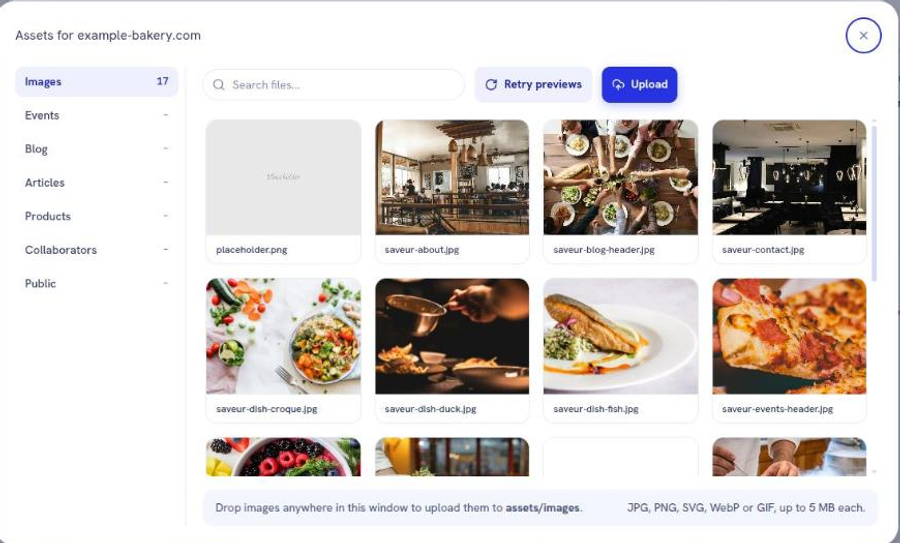
Where the file lands, and why it matters
The folder is chosen by which collection the image belongs to, not by where you happen to be standing.
Image for
Folder
A page
images
A blog post
blog
An article
articles
An event
events
A product
products
A collaborator profile
collaborators
Logo or favicon
public
An image filed in the wrong folder still uploads and still returns a web address. It goes missing when the build looks for it where the collection expects it. That failure surfaces as a broken image on the built site rather than as an upload error, which is what makes it worth getting right the first time.
Reference it correctly
The image field wants the filename and nothing else.
Correct: hero-photo.jpg
Wrong: /hero-photo.jpg
Wrong: assets/images/hero-photo.jpg
Wrong: https://example.com/hero-photo.jpg
The same rule applies to a background image: the filename goes inside url('...') with no leading slash.
Alt text
Alt text is the sentence a screen reader speaks and the text a search engine reads when the image fails to load. Describe what the image shows, in the context of the page it sits on.
Leave it empty only when the image is purely decorative and carries no information. An empty alt on a decorative divider is correct. An empty alt on a product photo is a fault.
Do not hand-optimise for speed
The build generates every image at several sizes and serves the right one per screen. A phone downloads a phone-sized image, not your original. So the file you upload decides neither how fast your page loads nor how much data a visitor on a metered connection pays for. Shrinking a photo before uploading buys you nothing on the page.
Upload size costs you two other things, both small: how long the upload takes, and whether you hit the ceiling.
The risk runs the other way. The build shrinks; it cannot invent detail, and it needs a large original to cut the large sizes from. Upload a 500 pixel wide photo, display it across a hero, and it will look soft on every screen, permanently. When in doubt upload the larger version and let the build decide what to serve.
A good habit that has nothing to do with speed: give the file a name that says what it is. saveur-dining-room.jpg is findable in a year. IMG_4471.jpg is not.
When an image does not appear
•
The filename in the field does not match the uploaded file, including its capitalisation.
•
The file went into the wrong folder for its collection.
•
The image was uploaded after the last build. Build a preview again.
Next
Change a page without touching code
Add a block, edit it, style it. The three moves the editor is built around.
Change the look of every page at once
One screen holds the colors, fonts, and logo every page inherits.
Work out what broke, in order
The failures people actually hit, each with its check and its repair.
Still stuck?
Send us the site name and what you were trying to do. A person answers, usually within one business day.