Building pages
Change the look of every page at once
Set a color in Global Design Settings and every page follows. Type the same color into a block and you own it forever.
Design, then Global Design Settings. Five colors, four fonts, one logo, one favicon. Every page reads from here.
The five colors
Name
Used for
Primary
Buttons, links, and the key graphic elements
Heading
Headline text
Background
The base page color
Accent
Borders, highlights, and secondary emphasis
Text
Body paragraphs
Blocks refer to these by name rather than by value. That indirection is the whole point: a rebrand becomes five edits instead of five hundred.
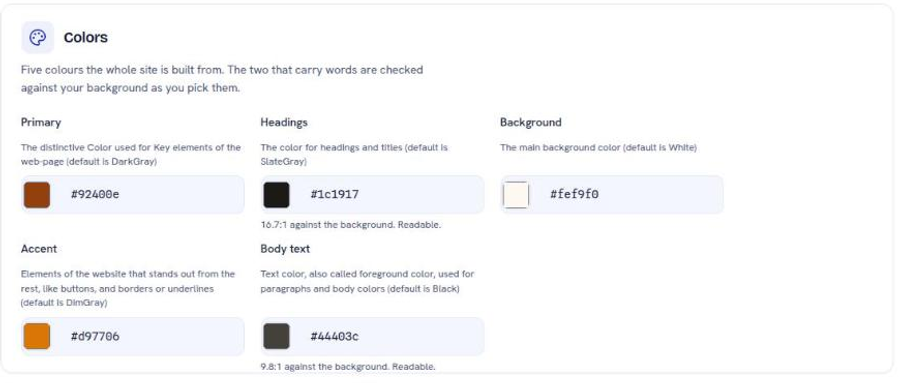
The two colours that carry words are checked for you. Headings and Body text each show their contrast ratio against your background, and whether it is readable. Watch that line as you pick: a pale accent on a pale background disappears on a phone in daylight, and the number tells you before your visitors do.
The fonts
Headings, body, action text (buttons and labels), and monospace. There is also a switch to use the body font for headings, for a deliberately flat, uniform look.
Two fonts is a design. Four is a ransom note. Change the heading font, keep the body font boring, and stop.
Logo and favicon
Upload a logo in the design assets folder, not alongside your page images. Three slots exist: a default, a light version, and a dark version. The light version is what renders on a dark footer, which is why a single dark logo disappears at the bottom of the page.
The favicon is the small icon in the browser tab. It is a separate upload and a separate slot.
Custom CSS, and when to touch it
Design, then Custom CSS, is a Cascading Style Sheets (CSS) file applied on top of everything in Design. The Console labels it accurately: a mistake here shows on every page.
Reach for it only when the design system genuinely has no way to express what you want. Before you do, check whether the block you are fighting has an option for it in the right-hand panel of the editor. It usually does.
What changing a color actually changes
Everything that referenced the name. That includes pages you have not opened in months, the footer, the navigation bar, every article, and every blog post. This is the intended behaviour and it is why the change is worth previewing before it goes live.
Build a preview and open three different kinds of page: a content-heavy one, one with a form or a listing, and the home page. Colors that work on one often fail on another.
Next
Change a page without touching code
Add a block, edit it, style it. The three moves the editor is built around.
Get an image onto a page
How to upload an image, where it lands, and the limit that will stop you.
Fix a layout that breaks on a phone
Desktop styling cascades to every screen. Here is what breaks and why.
Still stuck?
Send us the site name and what you were trying to do. A person answers, usually within one business day.