Building pages
Add a page and give it an address
A page that is not in the Page Map has no address. The content exists, and no visitor can reach it, and no build error tells you so.
The site is generated from the Page Map, not from the list of pages. That single fact explains most "my page is not showing" reports.
Create a page
1
Content, then Pages, then the create button.
2
Give it a slug. Lowercase letters, numbers, and hyphens only. The slug is the address.
3
Write the page.
4
Settings, then Page Map, and add an entry for it.
5
Build a preview and check it loads.
What a Page Map entry carries
Each entry names a path, points at a file, and decides whether the page appears in the navigation menu.
Field
What it does
Path
The address, for example /pricing
File
The page file the path renders
Show in menu
Whether the site navigation lists it
Order
Drag entries to reorder the menu
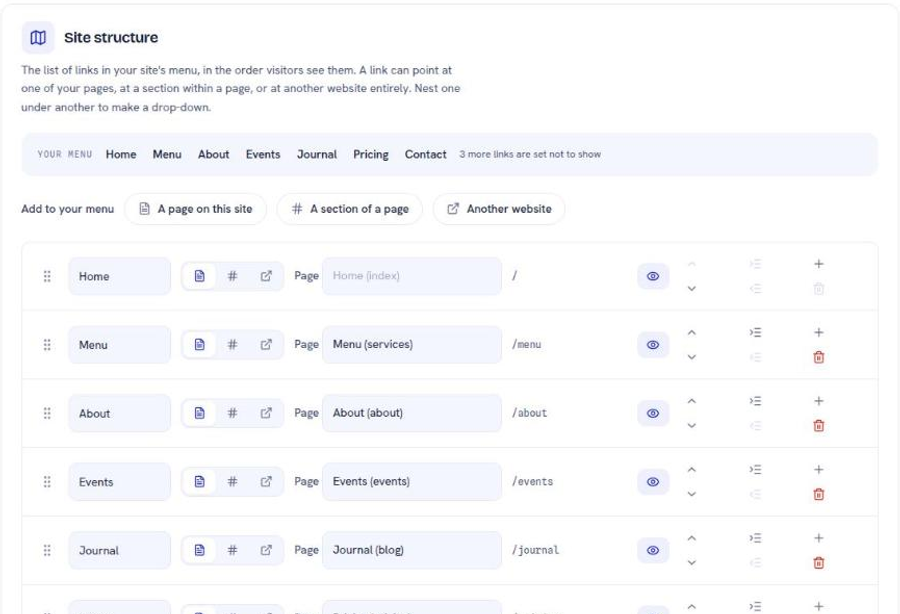
Turning Show in menu off does not hide the page. The page stays reachable at its address, indexable by search engines, and linkable from anywhere. It stops crowding the navigation bar. Legal pages, landing pages, and support articles all belong in that category.
Never change a slug
The slug is the address. Renaming it breaks every link anyone already has, every bookmark, and the search ranking that address has accumulated.
When a page genuinely needs a new address, create the new one and add a redirect from the old address to the new one. See redirects.
Two-level addresses
An address can carry two segments: /vs/wix and /support/domains both work. Three does not; the build refuses a path such as /support/billing/invoices.
The mechanism is worth knowing because it is not obvious. The page file itself stays flat, and the Page Map entry supplies the nested path:
Page Map path: /support/domains
Page file: support-domains
So a nested address is one flat page plus one Page Map entry that nests it. There is no folder anywhere.
Structuring a menu that stays usable
Put the pages people arrive looking for in the menu, and leave everything else out of it. A navigation bar of twenty items communicates less than one of six. The footer is the right home for the long tail.
Next
Change a page without touching code
Add a block, edit it, style it. The three moves the editor is built around.
Move a page without breaking its links
Keep old links working after a page moves, without a chain.
Control how your site describes itself
What search engines read from your site, and which fields change a result.
Still stuck?
Send us the site name and what you were trying to do. A person answers, usually within one business day.